Markup & review

See a bug? Circle it.

Bezel captures exactly what you are looking at, on the exact device, and opens a markup studio: draw on the shot, type numbered comments, hit copy — and paste feedback that explains itself into Slack, a ticket or an email. The device, viewport and URL travel baked into the image.

mark · comment · share  ·  no cloud  ·  no accounts  ·  100% local
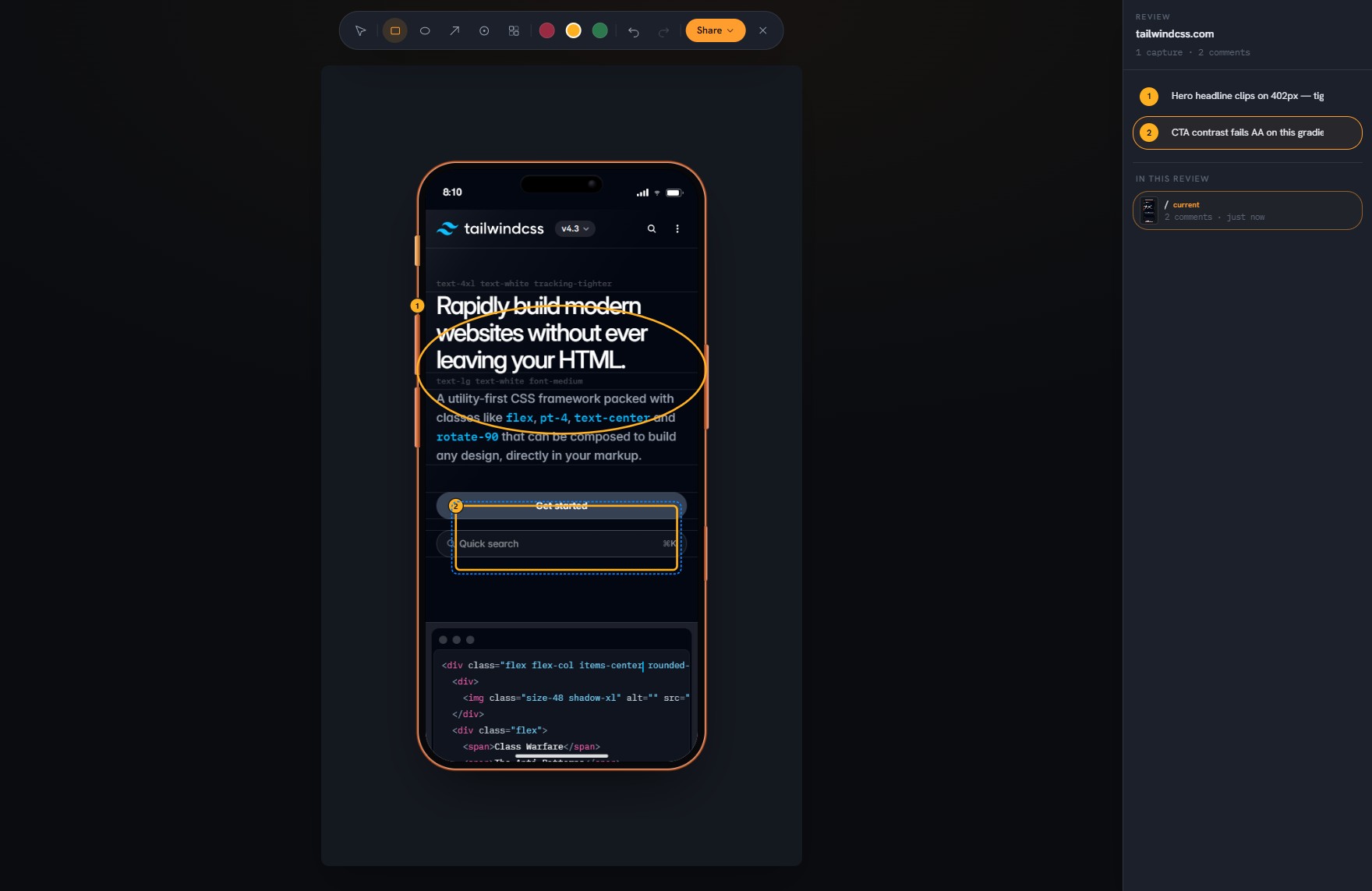
Bezel’s Markup studio: a circled headline and a boxed CTA on an iPhone, with numbered comments in a side rail
Feedback that lands

The universal currency of visual feedback is an image.

Cloud review platforms make your client sign up to see a pin. Bezel goes the other way: it produces the artifact — an annotated, device-true image or a print-ready review document — and lets it travel through the channels your team already uses. Nothing to install for the recipient, nothing uploaded by you.

  • Marks on the image, words in a rail. Rectangles, ellipses, arrows and numbered badges go on the shot; your comments live in a numbered side rail — never stamped over the page.
  • Context baked in. Every exported image carries the device name, viewport, pixel density and URL. Nobody has to ask “on which phone?”
  • Blur what’s private. Real pixelation for client data — in the exported file, not just on screen.
  • A review builds itself. Marked captures collect per site, automatically. Export a polished deck when you’re done — one page per capture, comments alongside.
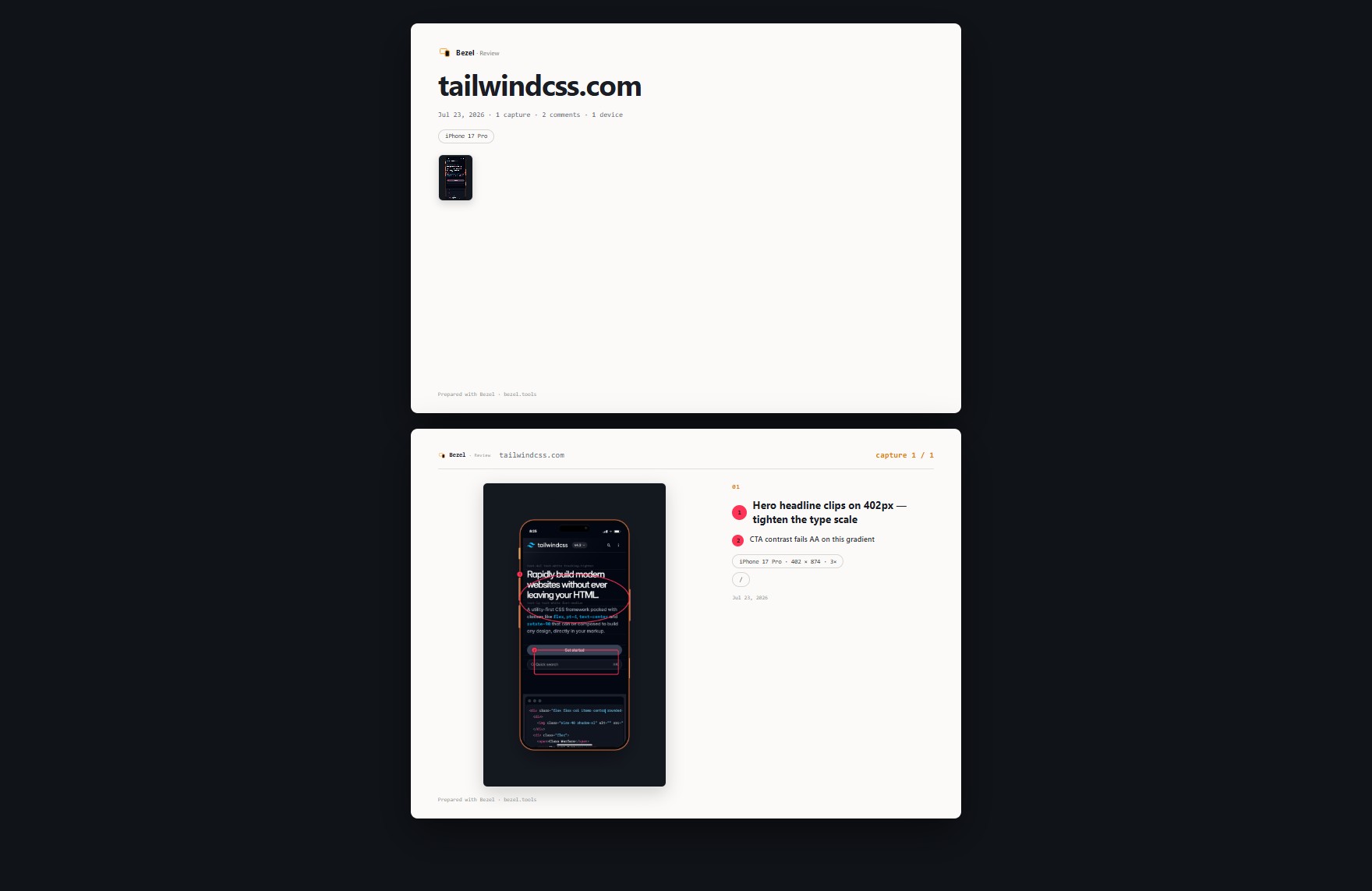
A page of Bezel's exported review deck: a framed capture with numbered comments and device context beside it.

A page from an exported review — one capture per page, your comments alongside, ready to print to PDF.

Why it matters

More than half of all web traffic is mobile. Most of it is checked on a desktop window.

A shelf of real test phones costs thousands and is out of date within a year. Bezel is free, runs in the browser you already have, and stays current with the latest devices — so the mobile view you sign off on is the one your visitors actually get.

Three steps

From spotted to shared in seconds

  • Hit Markup. Bezel captures the current view on the current device — scrolled exactly where you are.
  • Draw and type. Circle the problem; the numbered comment rail focuses as you draw. Enter, and keep going.
  • ⌘C, paste. The image lands in Slack or the ticket with marks, comments and device context baked in — or export the whole review as a client-ready document.
FAQ

Good questions

How do I annotate a website on a mobile device?+
Open the site in Bezel, pick a device, and hit Markup. Bezel captures exactly what you are looking at — on the exact device — and opens a markup studio: draw rectangles, ellipses and arrows, blur anything sensitive, and type a numbered comment for each mark in the side rail. Then copy the finished image straight to your clipboard.
Do my annotations need a cloud account or a share link?+
No. Everything runs on your machine. Sharing is an image you paste into Slack, a ticket or an email — with the device, viewport and URL baked into it — or a single self-contained review file you send like any other document. Nobody needs an account, and nothing is ever uploaded.
How is this different from MarkUp.io, Pastel or BugHerd?+
Those are cloud review platforms: the pin lives on their server and sharing means a hosted link. Bezel produces the artifact instead — a device-true annotated image or a print-ready review document — so feedback lands in the tools your team already uses, with zero accounts and zero uploads.
What is a review deck?+
Every capture you mark up on a site quietly collects into that site’s review. Export it and Bezel compiles a polished, print-ready document — one page per capture, your numbered comments beside each shot, device context on every page. Open it in any browser or print it to PDF.
Can I annotate below the fold or across several pages?+
Yes. Markup always captures the current view, so scroll anywhere — or navigate to another page — and hit Markup again. Each marked capture becomes its own entry in the review, and its own page in the exported deck.
Is the markup tool free?+
Drawing, commenting, blurring and copying the annotated image are part of the free framed-export allowance. Exporting the client review deck is a Pro feature.